
Timer is one of the best first roles in Toastmasters. You get on stage for a minute, you help every speaker, and you learn how a meeting fits together. Here are the timing rules, a script you can read aloud, and a report you can copy.
The timing rules
| Segment | Green | Yellow | Red |
|---|---|---|---|
| Prepared speech (5 to 7 min) | 5:00 | 6:00 | 7:00 |
| Ice Breaker (4 to 6 min) | 4:00 | 5:00 | 6:00 |
| Table Topics (1 to 2 min) | 1:00 | 1:30 | 2:00 |
| Evaluation (2 to 3 min) | 2:00 | 2:30 | 3:00 |
Green means the speaker has reached the minimum time, yellow means they should start wrapping up, and red means time is up. Some speech projects have different lengths, so check the agenda. Clubs vary on grace periods, and contests have their own rules, so ask your VP Education.
A script you can read aloud
When the Toastmaster introduces you, say something like this:
"Thank you, Toastmaster. As Timer, I help every speaker stay within their time. Prepared speeches tonight run 5 to 7 minutes. I will show green at 5 minutes, yellow at 6, and red at 7. Table Topics speakers have 1 to 2 minutes, and evaluators have 2 to 3. Back to you, Toastmaster."
What to do during the meeting
- Arrive early. Check the agenda for speech lengths and find a seat every speaker can see.
- Start the clock on the speaker's first word or gesture, not when they reach the lectern.
- Raise the right signal and hold it long enough for the speaker to notice.
- Write down each person's name and time as soon as they finish.
- Reset before the next speaker, so you are never caught out.
A sample Timer's report
"Thank you, General Evaluator. Tonight's speakers were Priya at 6 minutes 12 seconds and Marcus at 7 minutes 3 seconds. In Table Topics, all four speakers finished within time. Our evaluators were Dana at 2 minutes 40 and Luis at 2 minutes 55. Back to you."
Common mistakes
- Forgetting to start the clock when the speaker begins
- Holding up a card so briefly that nobody sees it
- Sitting where a speaker has to turn to see you
- Losing the times because they were never written down
The easier way: time it in Toastmanagers
Go to Utilities and open Meeting timer. Pick the agenda segment and Toastmanagers selects the matching preset, so you are not working out the green, yellow, and red times yourself. Press Start, and the whole page changes color as each time passes.
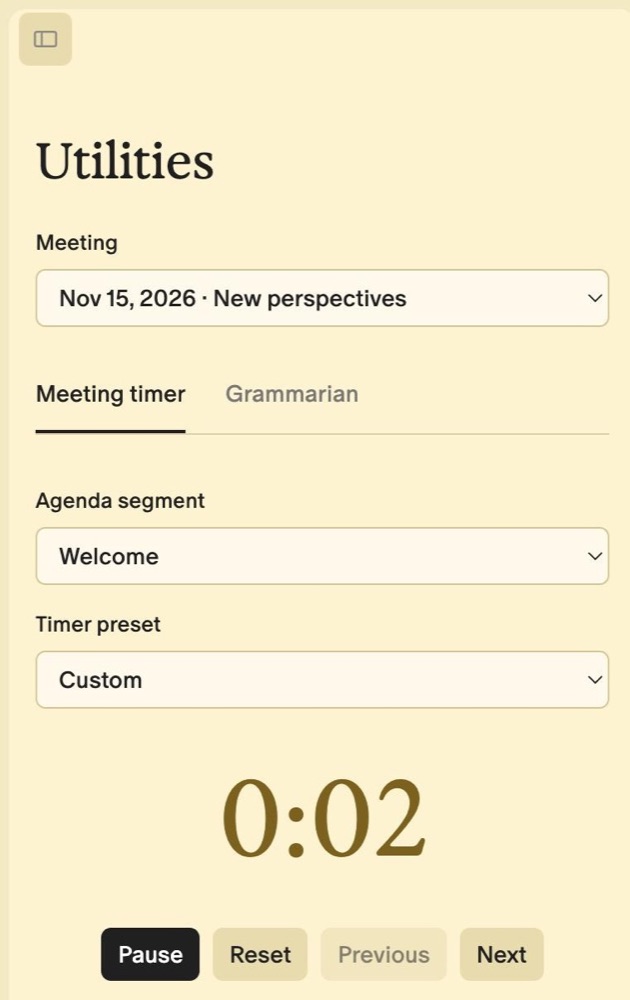
When a speaker finishes, type their name and press Log time. Your timing log builds as you go, and if your signal drops, logged times wait in your browser until you can save them. Prefer paper? The Agenda PDF includes a Timer sheet with the signal times for each segment.
Give Your Timer a Better Clock
Free for core club ops. Works on any phone, with nothing to install.
Get Started FreeNo credit card required.
Frequently Asked Questions
What happens if a speaker goes over time?
In a regular meeting, you record the time and include it in your report. Your club decides whether going over affects awards.
Can I use my phone as the Timer?
Yes. Extend your screen timeout first, and keep colored cards handy, because a phone is hard to see from across a room. Read how to run a meeting from your phone.
Is Timer a good first role?
Yes. It is short, clearly defined, and a friendly way to speak in front of the club for the first time.